
Learn Django Rest Framework:

Django REST framework is a powerful and flexible toolkit for building Web APIs.
Some reasons you might want to use the REST framework:
- The Web browsable API is a huge usability win for your developers.
- Authentication policies include packages for OAuth1a and OAuth2.
- Serialization that supports both ORM and non-ORM data sources.
In part 01 we will learn how to set up a Django Rest Framework project.
Before you start, make sure you have installed these three things in your system.
- Make sure you have installed the latest Python Version. Download Here.
- vscode studio is installed in your system. Download here.
- Install PIP. Download for MAC, for Windows.
Open VsCode, then open Terminal in your VsCode.
Create a folder for your project.
$ mkdir drfproject
Then open drfproject directory in vscode.
First of all, we will create a virtual environment.
Create a virtual Enviornment (For Mac user)
$ python3-m venv env
Now activate the virtual env.
$ source env/bin/activate
Now install some packages
$ pip install django
$ pip install djangorestframework
Now let’s create a Django project.
Create Djago proejct, i am giving name core, you can give any name
$ django-admin startproject core .
Now create a Django app
$ python manage.py startapp app1
Add the app1 in INSTALLED_APPS of your settings.py file of the project folder.
Also, add rest_framework.
After adding, it will look like the below.
# Application definition
INSTALLED_APPS = [
‘django.contrib.admin’,
‘django.contrib.auth’,
‘django.contrib.contenttypes’,
‘django.contrib.sessions’,
‘django.contrib.messages’,
‘django.contrib.staticfiles’,
‘app1’, #new
'rest_framework', #new
]
Now we are done with our project setup. WOW!
This is what How Project structure will look like.
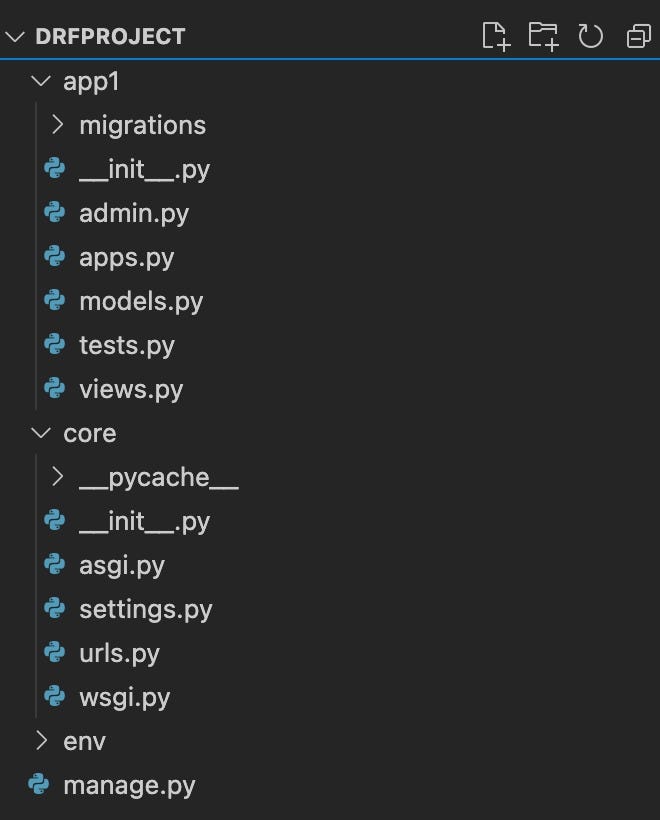
Now Let’s discuss the Project structure.
The outer DRFProject/ root directory is a container for your project.
manage.py: A command-line utility that lets you interact with this Django project in various ways. You can read all the details about manage.py in django-admin and manage.py.
The inner Core/ directory is the actual Python package for your project. Its name is the Python package name you’ll need to use to import anything inside it (e.g. Core.urls).
Core/init.py: An empty file that tells Python that this directory should be considered a Python package. If you’re a Python beginner, read more about packages in the official Python docs.
Core/settings.py: Settings/configuration for this Django project.
Core/urls.py: The URL declarations for this Django project; a “table of contents” of your Django-powered site. You can read more about URLs in URL dispatcher.
Core/asgi.py: An entry-point for ASGI-compatible web servers to serve your project.
Core/wsgi.py: An entry-point for WSGI-compatible web servers to serve your project.
Let me explain first about the app App1 structure.
The migrations folder is where Django stores migrations, or changes to your database.
__init__.py tells python that your organization app is a package.
admin.py is where you register your app’s models with the Django admin application.
apps.py is a configuration file common to all Django apps.
models.py is the module containing the models for your app basically ORM modeling.
tests.py contains test procedures which run when testing your app.
views.py is the module containing the views for your app or where we write our business logic.
Now we are done with our project structure.
In Next Part 02, we will create APIs.
Thanks for reading my Article.